
IPTV Reseller Panel: A Simple Tour, Screen by Screen
The IPTV Reseller Panel: A Simple Tour, Screen by Screen
This is the IPTV reseller panel you get as a GoToIPTV reseller. Below are real screenshots with numbered green circles, and a short explanation of every number.
Usernames, customers, passwords, links and business numbers are blurred to protect privacy.
 6screens explainedAnybrowser or phone1 minto add a customer
On This Page
What Is an IPTV Reseller Panel?
Think of it as the shop counter of your IPTV business: the place where every sale, every renewal and every customer lives.
An IPTV reseller panel is a private website where you run your customers. You log in, you see your credits, and in a few clicks you create a new customer, renew one, or check who is watching.
Everything you do in the IPTV panel uses credits: one credit is one month of IPTV for one customer. The panel always shows the price in credits and the new end date before you confirm, so there are no surprises.
Customers: create, renew and edit accounts.
Credits: always visible, used per month.
End dates: see who needs a renewal.
Control: notes, locks and channel groups.
The IPTV Reseller Panel Dashboard
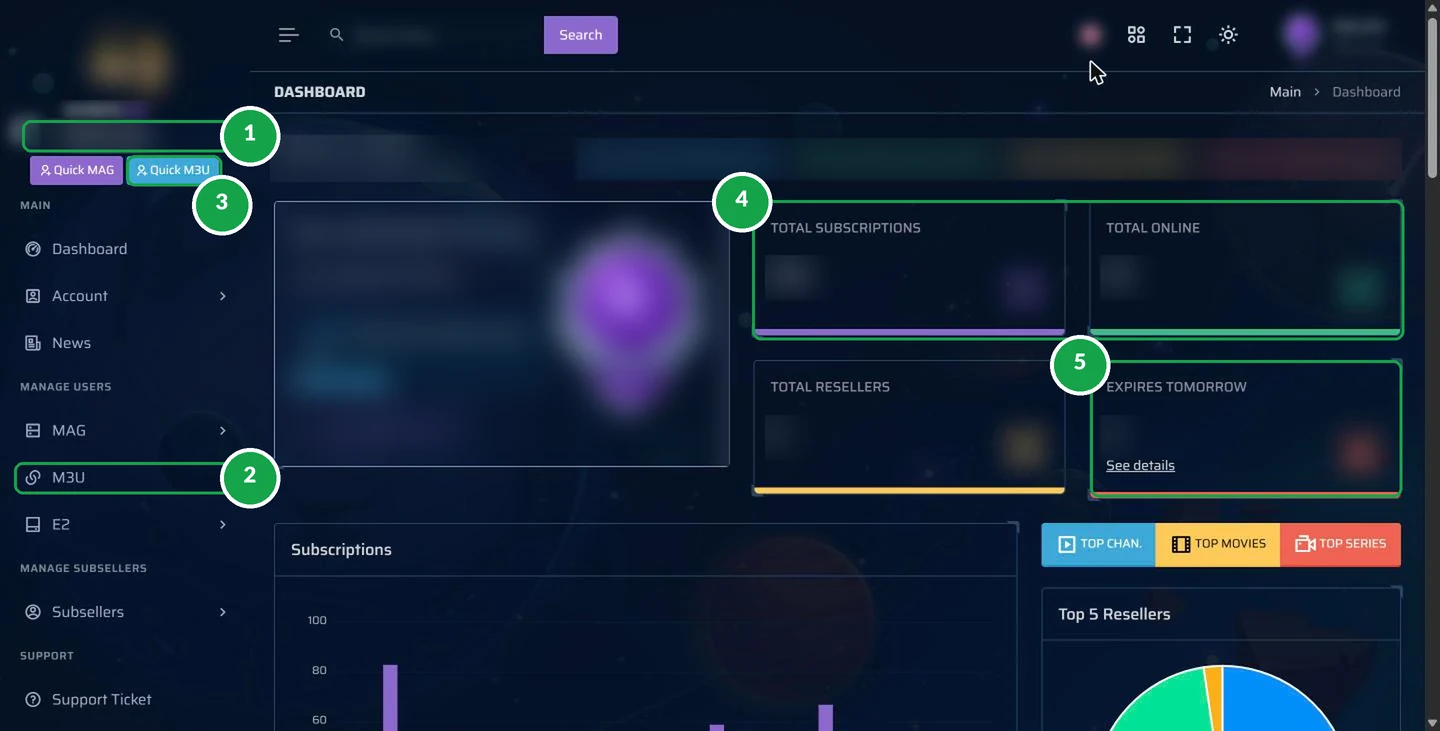
The first screen after you log in. It tells you, at a glance, how your business is doing.
Tap to open full size- 1Your credits. The balance of credits left in your IPTV reseller panel, always at the top of the menu.
- 2M3U menu. Your customer list and the Add New page live here. MAG and E2 are for MAG boxes and Enigma2 receivers.
- 3Quick M3U. A shortcut to create a customer line in seconds.
- 4Totals. How many customers you have and how many are watching right now.
- 5Expires tomorrow. The customers whose plan ends tomorrow, with a “See details” link: your renewal list for the day.
Your Customer List
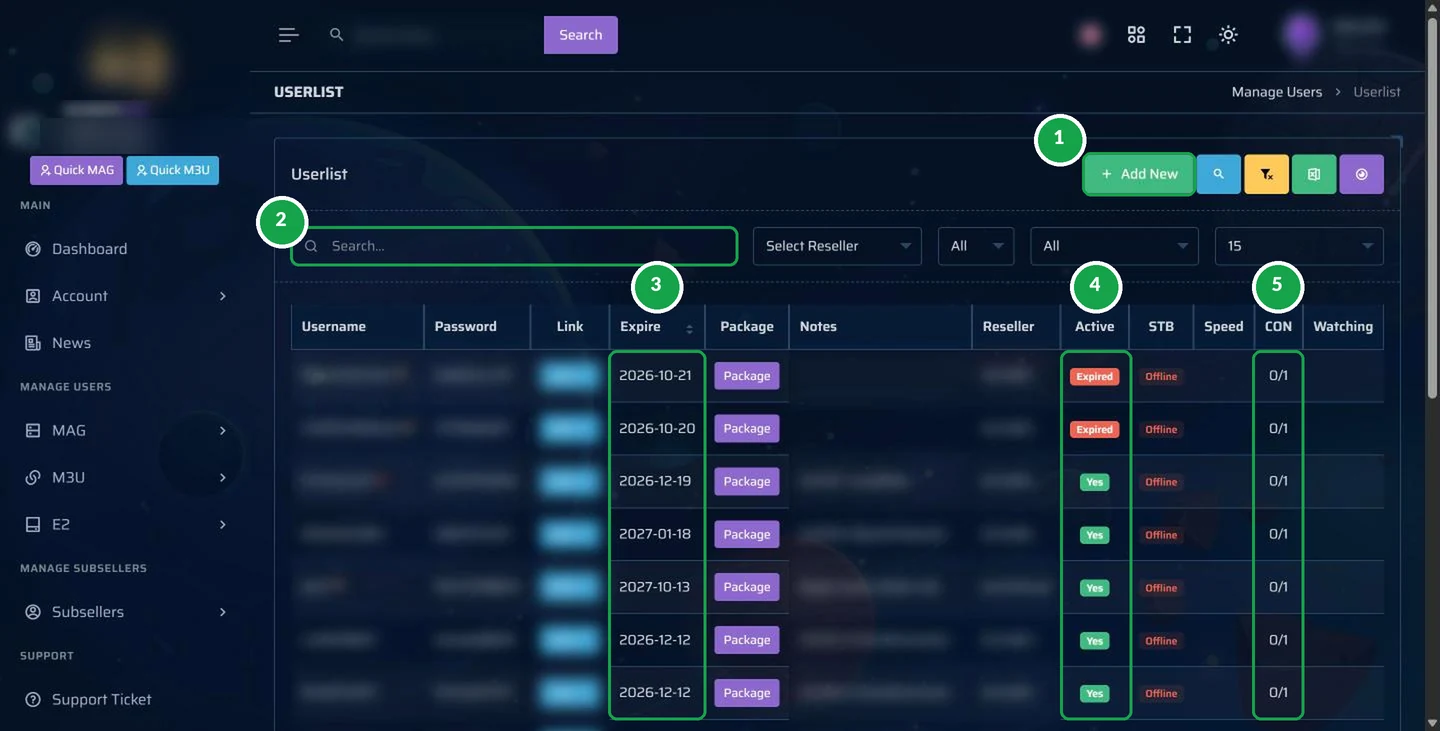
Every account you create appears here, with its status and end date.
 Tap to open full size
- 1Add New. Create a new customer account.
- 2Search. Find a customer by username or note in a second.
- 3Expire. The end date of each account. Sort by it to see who needs a renewal first.
- 4Active. Green “Yes” means the account works; red “Expired” means it needs a renewal.
- 5CON. Connections in use out of the allowed number, for example 0/1 for one screen.
Each customer also has an Action button with the tools you will use most: Edit, Renew, copy the playlist link, disconnect a device, and lock options that protect the account.
Add a Customer in One Minute
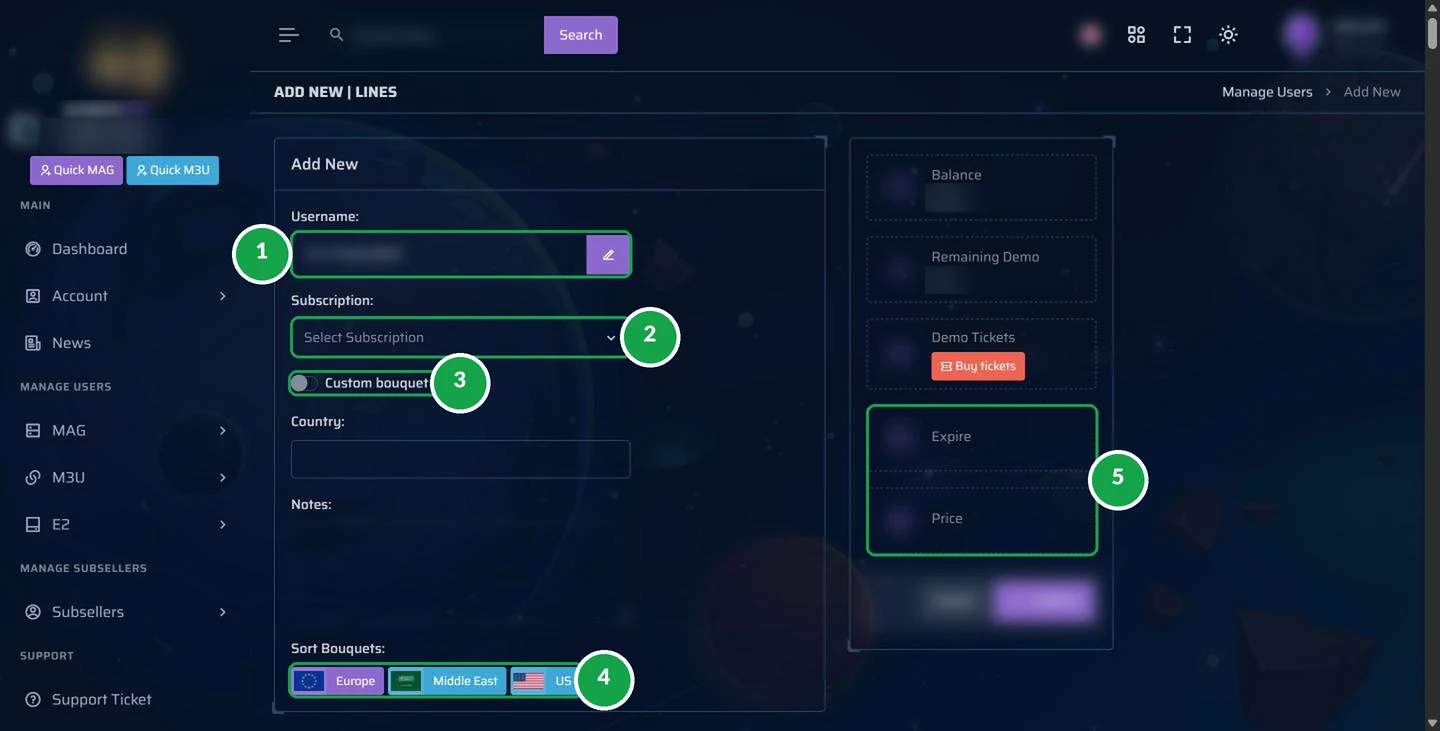
This is where your IPTV business happens: a new customer, a new sale.
 Tap to open full size
- 1Username. Created for you automatically. Click the pencil to choose your own.
- 2Subscription. Pick the length: 1, 3, 6 months or 1 year.
- 3Custom bouquet. Switch it on to choose which channel groups this customer gets.
- 4Sort bouquets. Order the channel groups by region, such as Europe, Middle East or US.
- 5Expire and price. The new end date and the credits it costs, shown before you press Confirm.
Use the Notes field for anything that helps you later: the customer’s first name, their device, or how they paid. Notes are private to your IPTV reseller panel.
Subscription Lengths and Credits
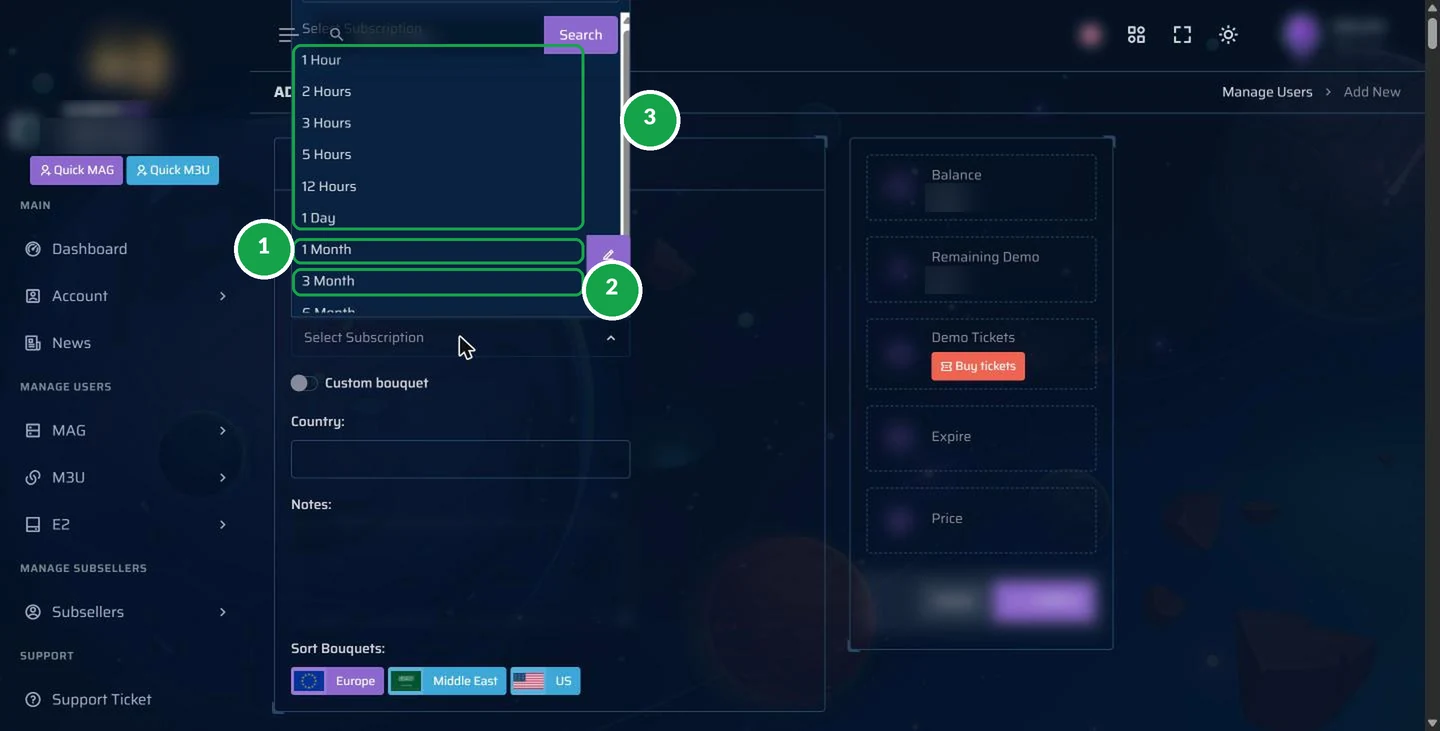
The subscription list decides how long the account runs and how many credits it uses.
 Tap to open full size
- 11 Month. Uses 1 credit. Perfect for a first-time customer.
- 23 Months. Uses 3 credits. Below it in the list you will also find 6 months and 1 year.
- 3Short lengths from 1 hour to 1 day, used for tests. Ask the admin how test lines work for your account.
| Length you choose | Credits used | Your cost at $2.75 |
|---|---|---|
| 1 month | 1 | $2.75 |
| 3 months | 3 | $8.25 |
| 6 months | 6 | $16.50 |
| 1 year | 12 | $33 |
See every package price on the IPTV reseller credits page.
Renew a Customer Without a New Login
Renewals are the easiest money in your IPTV business. In the panel they take three clicks, and the customer does not have to do anything at all.
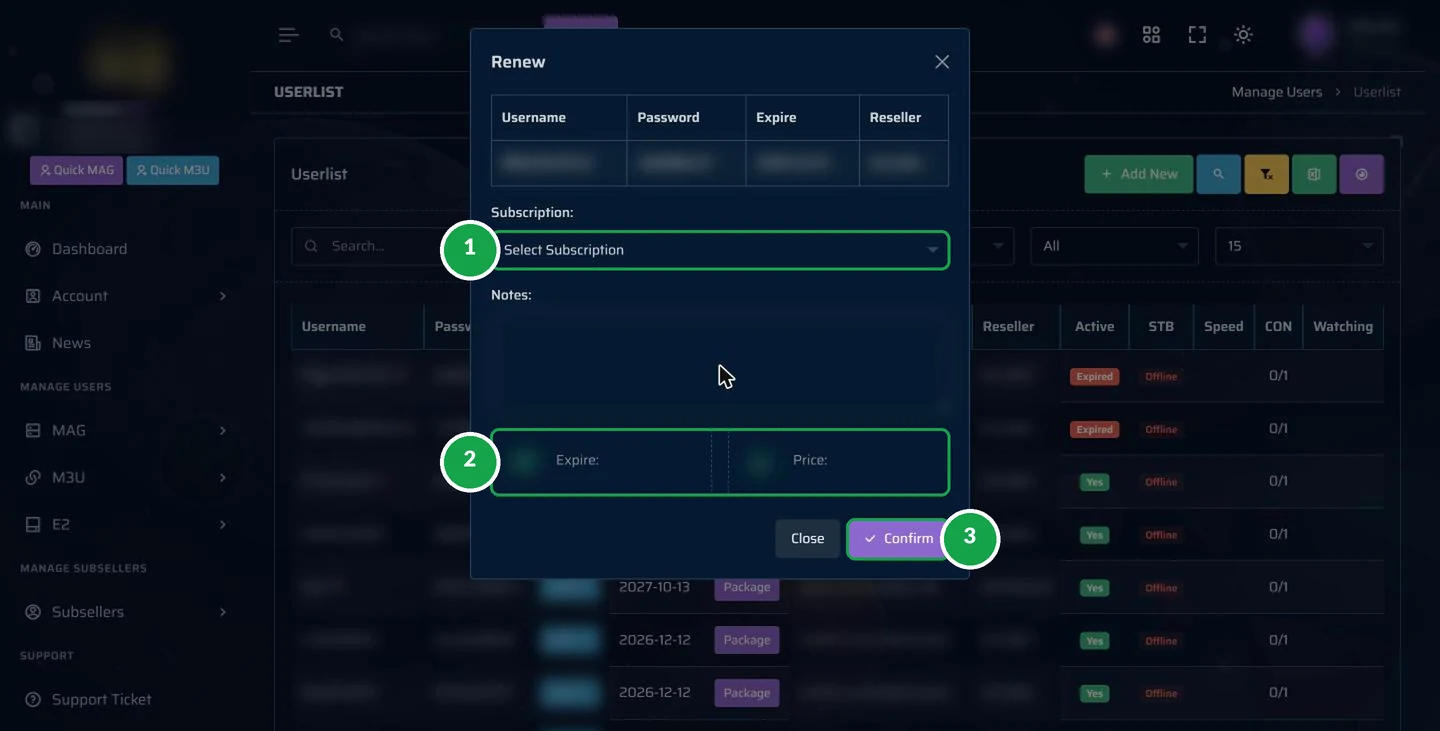 Tap to open full size
- 1Subscription. Choose how many months to add.
- 2Expire and price. Check the new end date and the credits it uses.
- 3Confirm. Done. The customer keeps the same login and keeps watching.
Open it from the customer list: click Action on the customer, then Renew. Do it a day or two before the end date, and the customer never notices a gap.
Bouquets: Choose the Channel Groups
Some customers only want channels from one region. Bouquets make that easy.
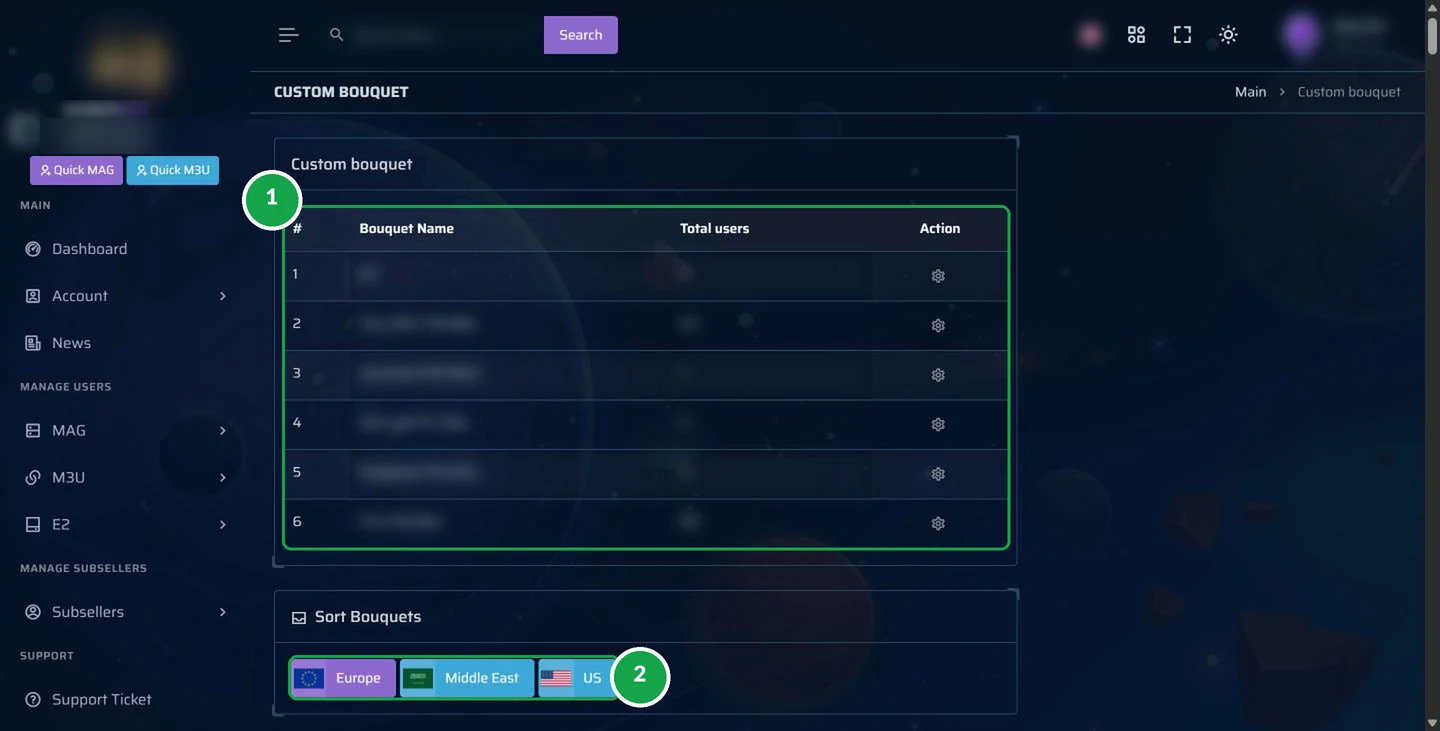 Tap to open full size
- 1Your custom bouquets. Saved channel groups you can give to customers, with the number of users on each.
- 2Sort bouquets. Put the regions your customers care about first: Europe, Middle East or US.
Tip: a lighter channel list loads faster on older devices, and customers find their favourites sooner.
Other Parts of the IPTV Panel
You will use the screens above every day. These menus are there when you need them:
MAG
Add and manage customers who use MAG set-top boxes.
E2
Add and manage customers who use Enigma2 receivers.
Account
Change your password and switch on two-step login.
Support
Open a ticket, or simply message the admin on WhatsApp.
News
Updates about the service, all in one place.
IPTV Panel Words Explained
New to IPTV? Here are the words you will see in the panel, in plain English:
| Word | What it means |
|---|---|
| Credit | One month of IPTV for one customer. Your balance shows how many you have left. |
| Line | One customer account, with its own username and password. |
| M3U | The most common type of account, used by apps like GoTo Player. The playlist link is copied from here. |
| MAG | A type of set-top box. MAG customers are added from the MAG menu. |
| E2 / Enigma2 | Satellite-style receivers. They have their own menu. |
| Bouquet | A group of channels, for example by region. You can give a customer only the groups they want. |
| CON | Connections: how many screens are watching out of the number allowed. |
| Expire | The date the account stops unless you renew it. |
| Lock | A protection that stops a line being used from somewhere it should not be. |
| Kick out | Disconnects the device watching right now, useful when a customer changes TV. |
Customer Problems You Can Fix From the Panel
Most customer messages have a two-minute answer in your reseller IPTV panel:
Anything else, or not sure? Send the admin the customer username, the device and a photo of the screen, and you get the answer to pass on.
What to Send a New Customer
After you create an account in the IPTV reseller panel, send one clear message. Here is a template you can copy:
Welcome! Your TV is ready.
1. Install GoTo Player: on Firestick use the Downloader app and code 1129312. On Android TV, phones and Windows, see gotoiptv.com/goto-player/.
2. Log in with your username and password: [username] / [password].
3. Your plan ends on [date]. I will remind you before then.
Any problem? Message me here, any time.
Short, friendly and complete: the customer has everything in one place, and you get fewer questions later.
Your 3-Minute Daily Routine in the Panel
Most resellers only need a few minutes a day in the IPTV reseller panel:
- 1
Open the dashboard and look at “Expires tomorrow”.
- 2
Message those customers with a friendly reminder and your price.
- 3
Renew the ones who paid from the customer list (Action, Renew).
- 4
Add any new customers with Add New, then send them the login and the set-up guide.
- 5
Check your credits and top up before you run low.
Your customers install the free GoTo Player, and our guides show them how. Questions? The admin answers 24/7.
Using the IPTV Reseller Panel on Your Phone
You do not need a computer to run your IPTV business.
The IPTV reseller panel opens in the browser of any phone. Tap the menu button at the top left to open the side menu, and every screen in this tour is there: the dashboard, the customer list, Add New and Renew.
Tip: add the panel to your phone’s home screen from the browser menu. It then opens like an app, one tap away, whenever a customer messages you.
- Create a customer while you are out
- Renew someone in the evening from the sofa
- Check who ends tomorrow over breakfast
- Copy a login and paste it in WhatsApp
How the Admin Teaches You the IPTV Reseller Panel
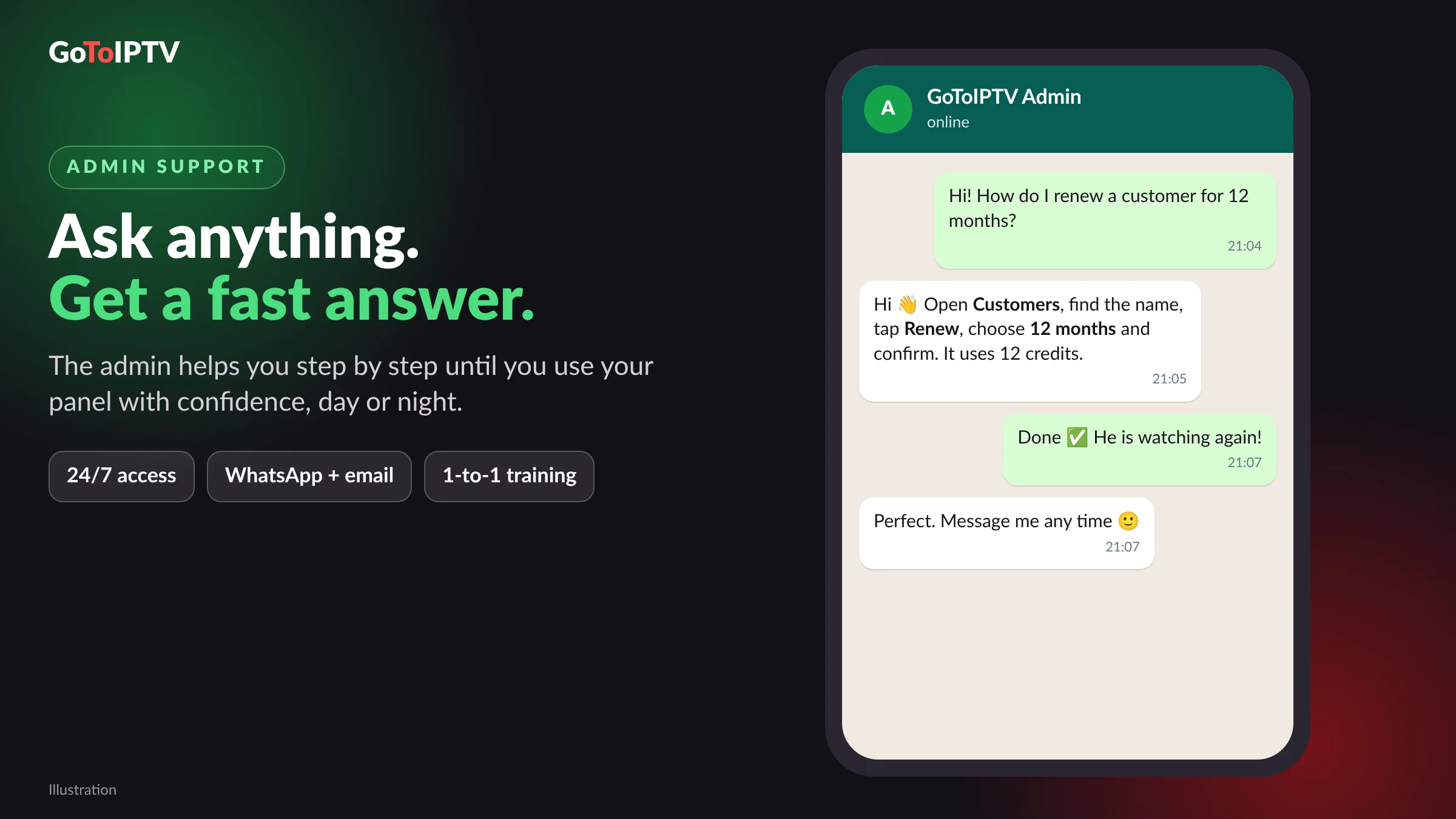
Nobody expects you to learn the panel alone.
- 1
A guided tour of every screen on this page, on WhatsApp, at your pace.
- 2
Your first customer created together, with the admin checking each field.
- 3
Your first renewal done together, so you know the routine.
- 4
Questions any time: day or night, the admin answers fast.
Most resellers feel at home in the IPTV reseller panel after one short session. This page is there for the days you want a quick reminder.
Keep Your IPTV Reseller Panel Safe
Your panel holds your credits and your customers. Protect it like a bank app:
- Use a strong, unique password for your panel.
- Switch on two-step login in Account.
- Never share your panel login with customers or friends.
- Log out on shared computers.
- Double-check before you confirm: the length, the end date and the price.
- Message the admin if anything looks wrong.
Get Your Own IPTV Reseller Panel
Choose a package of credits and the admin opens your panel with the username you want. Set-up is free until 31 December 2026.
- Example: 10 customers for 1 year
- Your own reseller panel
- Free GoTo Player for your customers
- Admin help 24/7
- Example: 30 customers for 1 year
- Your own reseller panel
- Free GoTo Player for your customers
- Admin help 24/7
- Example: 50 customers for 1 year
- Your own reseller panel
- Free GoTo Player for your customers
- Admin help 24/7
- Personalised price per credit
- Your own reseller panel
- Free GoTo Player for your customers
- Admin help 24/7
1 credit = 1 month of IPTV for 1 customer (one screen). A 12-month account uses 12 credits. Prices in US dollars.
Open my reseller panel
IPTV Reseller Guides
Curious about the technology behind it? Read how IPTV works.
IPTV Reseller Panel FAQ
What is an IPTV reseller panel?
An IPTV reseller panel is a private website where a reseller creates, renews and manages customer accounts using credits. It shows your credits, your customers, their end dates and who is online.
Can I use the IPTV reseller panel on my phone?
Yes. The panel opens in any browser, on a phone, a tablet or a computer. Many resellers create and renew customers straight from their phone.
How do I create a customer in the panel?
Open M3U, then Add New. Keep or change the username, choose the subscription length, pick the channel groups if you want, check the end date and price on the right, and confirm.
How do I renew a customer?
Open the customer list, click the Action button on the customer, choose Renew, pick the months, check the new end date and price, and confirm. The customer keeps the same login.
What do the numbers in the screenshots mean?
Each green number points to one part of the IPTV reseller panel, and the list next to each picture explains it in plain words.
Can I give a customer only some channels?
Yes. When you add a customer you can switch on a custom bouquet and choose the channel groups, for example by region.
Can I see when a customer’s plan ends?
Yes. The customer list shows the end date of every account, and the dashboard shows how many accounts end tomorrow, so you can remind them in time.
Are there short test lines?
The panel lists short lengths, from 1 hour to 1 day, used for tests. Ask the admin how test lines work for your account.
Is my panel safe?
Your panel has its own login. Use a strong password, switch on two-step login in Account, and never share your login with customers.
Can I change a customer’s channels later?
Yes. Open the customer from the list, choose Edit, and change the bouquet. The customer refreshes their app to see the new channel list.
What happens when a customer’s plan ends?
The account shows as Expired in red and stops working until you renew it. Renew it from the Action menu and it works again with the same login.
Does a renewal cost the same as a new customer?
Yes. A renewal uses the same credits as a new account of the same length: one credit for each month.
Who helps me learn the panel?
The admin. You get a one-to-one tour on WhatsApp, and you can ask questions 24/7.
Start Using Your IPTV Reseller Panel
Pick your package, send the form, and the admin gives you a one-to-one tour of your new panel.
